
COMPRESS Support For Multiple ASME Code Editions
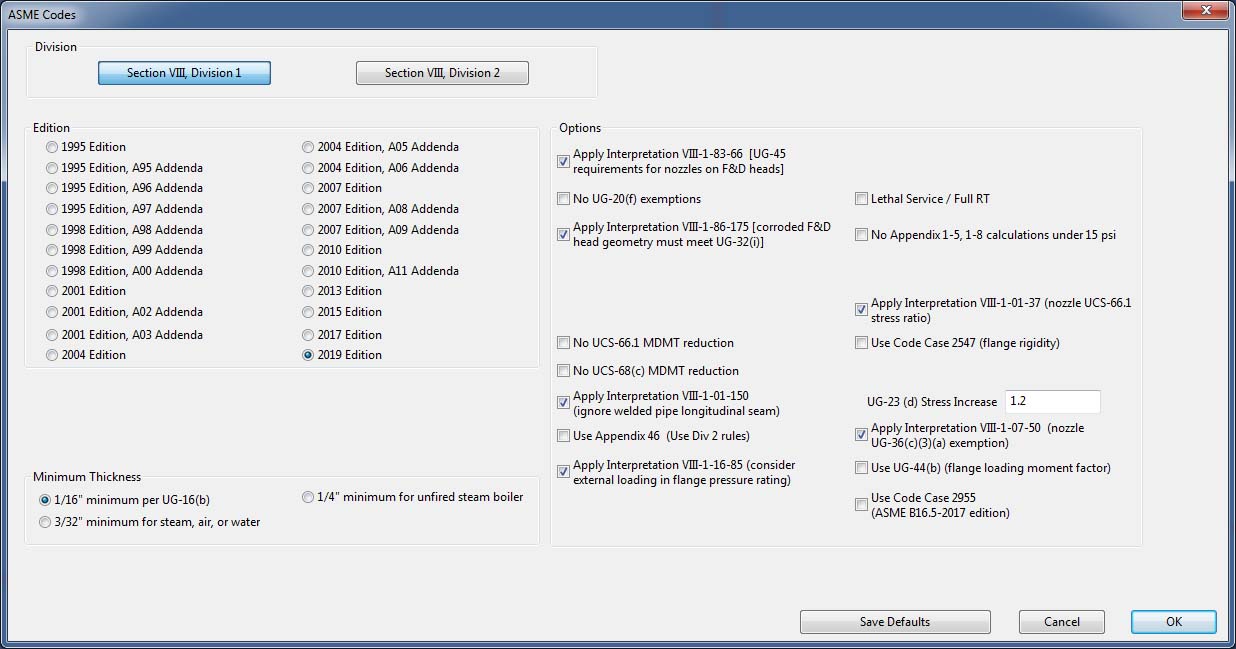
Multiple ASME Editions and Addenda (1995 – present) are available within COMPRESS to enable users to easily update older designs to be compliant with the latest Code rules (ideal when providing re-order/replacement designs). To ensure the integrity of the result, only material properties specific to the chosen Edition or Addenda are available for selection.
This feature enables you to:
- Work on projects spanning multiple years without needing multiple software versions installed. Design and re-rate equipment to different Addenda (1995 to present) from within the same COMPRESS release.
- Easily update older designs to be compliant with the latest ASME Edition (ideal when providing re-order/replacement designs).
- Use the same COMPRESS version throughout your entire company. Take advantage of recent enhancements, like Longitudinal Seam Placement and Rigging Analysis, nozzle copy and paste and UG-44 (Code Case 2901) while still maintaining access to older Codes.
- Stay up-to date with the latest Code while eliminating the time required to maintain internally developed and verify spreadsheet macros.
Multiple ASME Editions Feature Details
Once you’ve set the Addenda/Edition (single switch) everything else follows automatically. You do not need to remember to change several settings. Based on your selection COMPRESS automatically applies:
- The Edition/Addenda’s Code rules.
- The allowable stresses from the corresponding Edition of Section II Part D (design factors change over time).
- The ASME B16.5 and B16.47 flange materials and pressure ratings from the Edition specified in Table U-3 of Section VIII, Division 1 (materials and pressure ratings often vary slightly between Editions).
In Design Mode, if any design changes are needed to keep your equipment in Code compliance, COMPRESS automatically makes the necessary adjustments (such as increasing the nominal thickness). In Rating Mode no design adjustments are made but design deficiencies are noted.


+1 (941) 927-2670 | sales@codeware.com