
Shopfloor’s Welding QC Dashboard

Take control of weld quality in real time. The Welding QC Dashboard in Shopfloor lets you:

  • Manage jobs
  • Assign welds
  • Define inspections

  • Track progress from start to finish

With live status views and welder performance charts, you’ll streamline production, strengthen compliance, and keep every project on schedule.
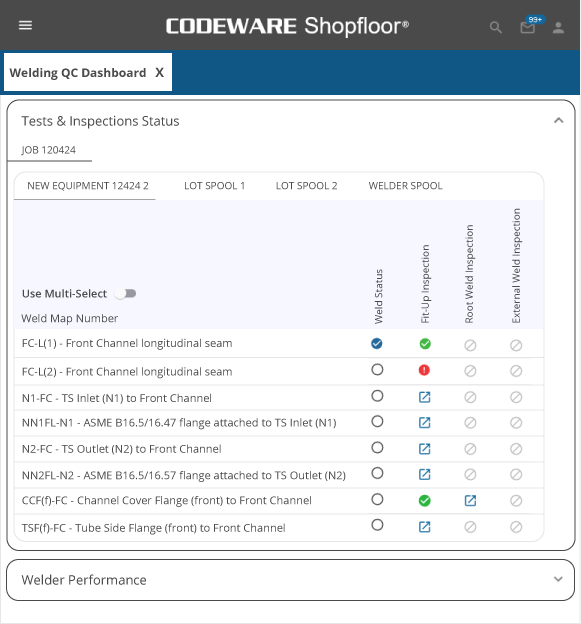
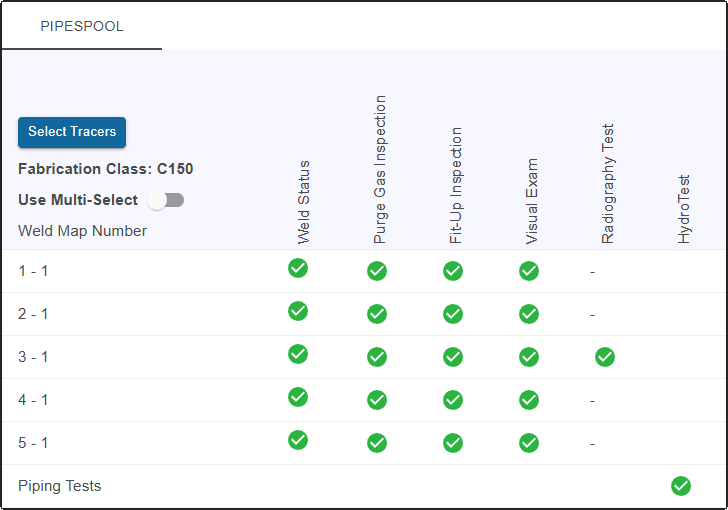
Shopfloor QC Welder Dashboard
Quality Control Dashboard in Shopfloor

Streamlined QC for Every Weld, Every Time

Shopfloor’s Welding QC Dashboard transforms how fabrication teams manage quality control. From a single interface, users can select active jobs, monitor every weld in real time, and assign work to qualified welders following the proper procedures. Inspection and testing requirements can be planned and tracked at each stage — with digital sign-offs or waivers recorded as production advances.

Once complete, the dashboard delivers performance analytics, showing trends in welder efficiency and weld quality. The result is a smarter, more transparent, and fully traceable QC workflow that reduces rework, improves compliance, and drives continuous improvement across the shop floor.

How the Welding QC Dashboard Works

Start by identifying one or more active jobs within your facility. The dashboard automatically displays each weld associated with those jobs.
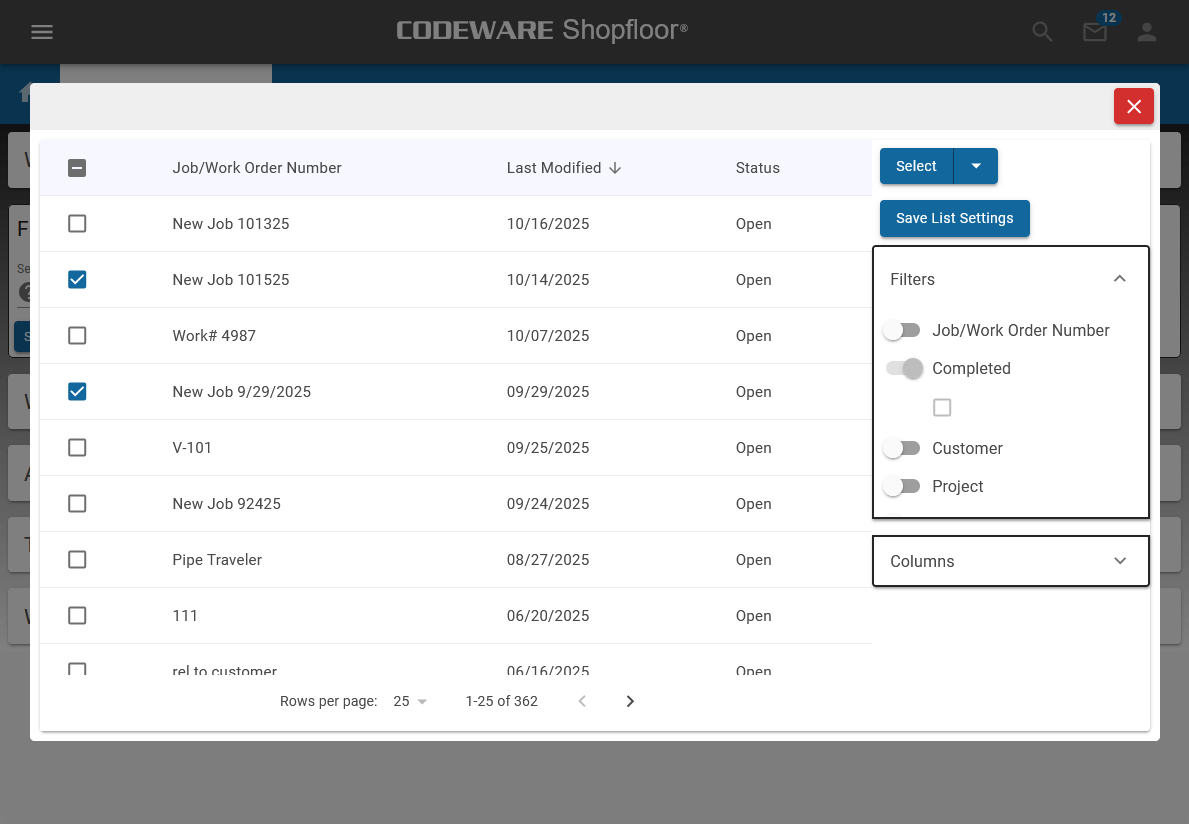
Shopfloor QC Dashboard - Select Your Job

Allocate welds to available, qualified welders and link each one to the correct welding procedure, ensuring full ASME IX and AWS compliance.
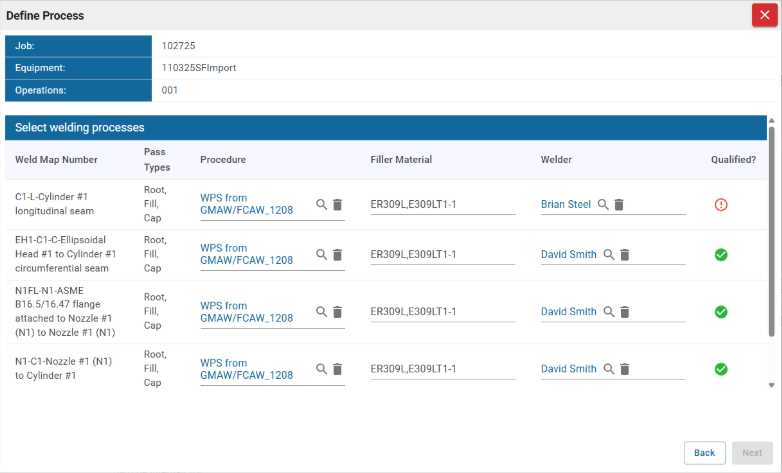
Welding Processes in Shopfloor

Specify which inspection and testing activities will be performed at every weld—from fit-up to final examination.
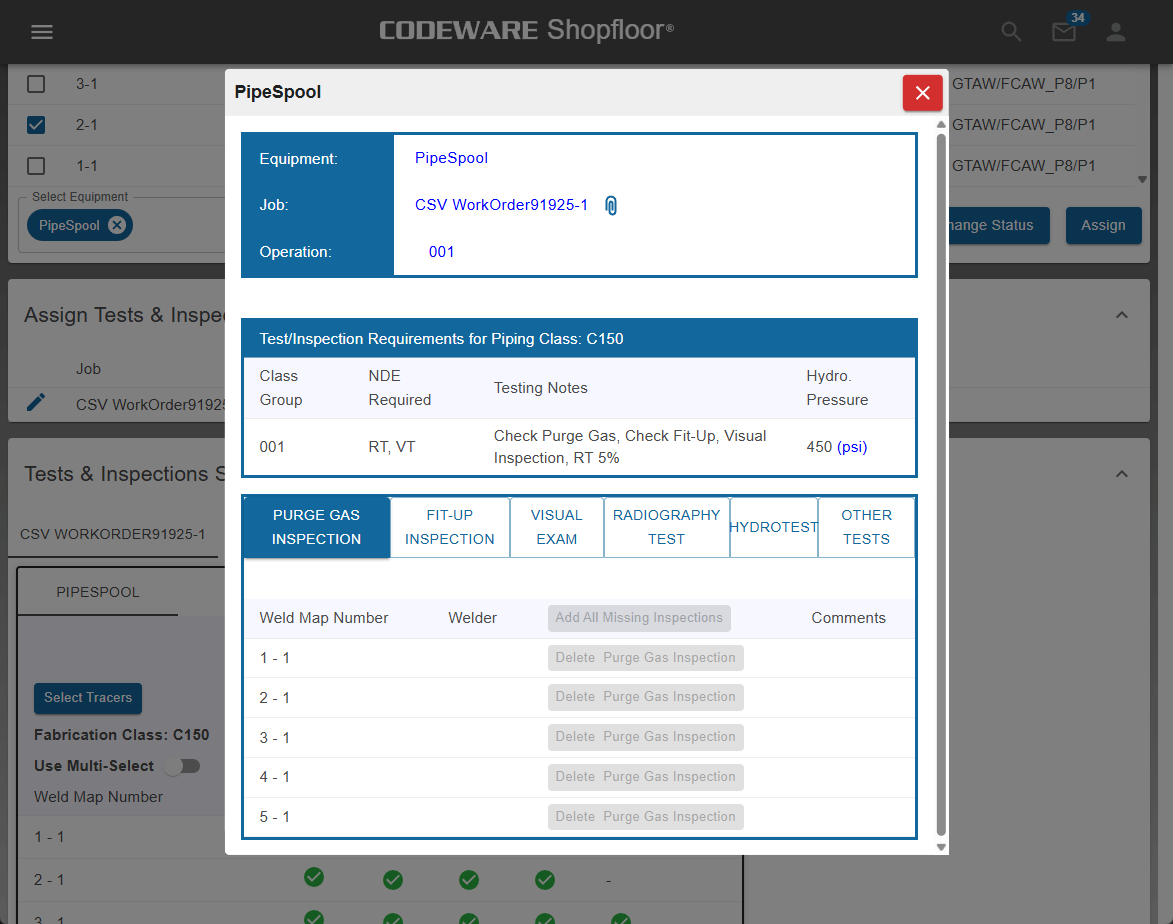
Shopfloor QC Dashboard - Define Inspections

As production advances, users can sign off on or waive individual tests directly within the dashboard, maintaining full traceability at every step.
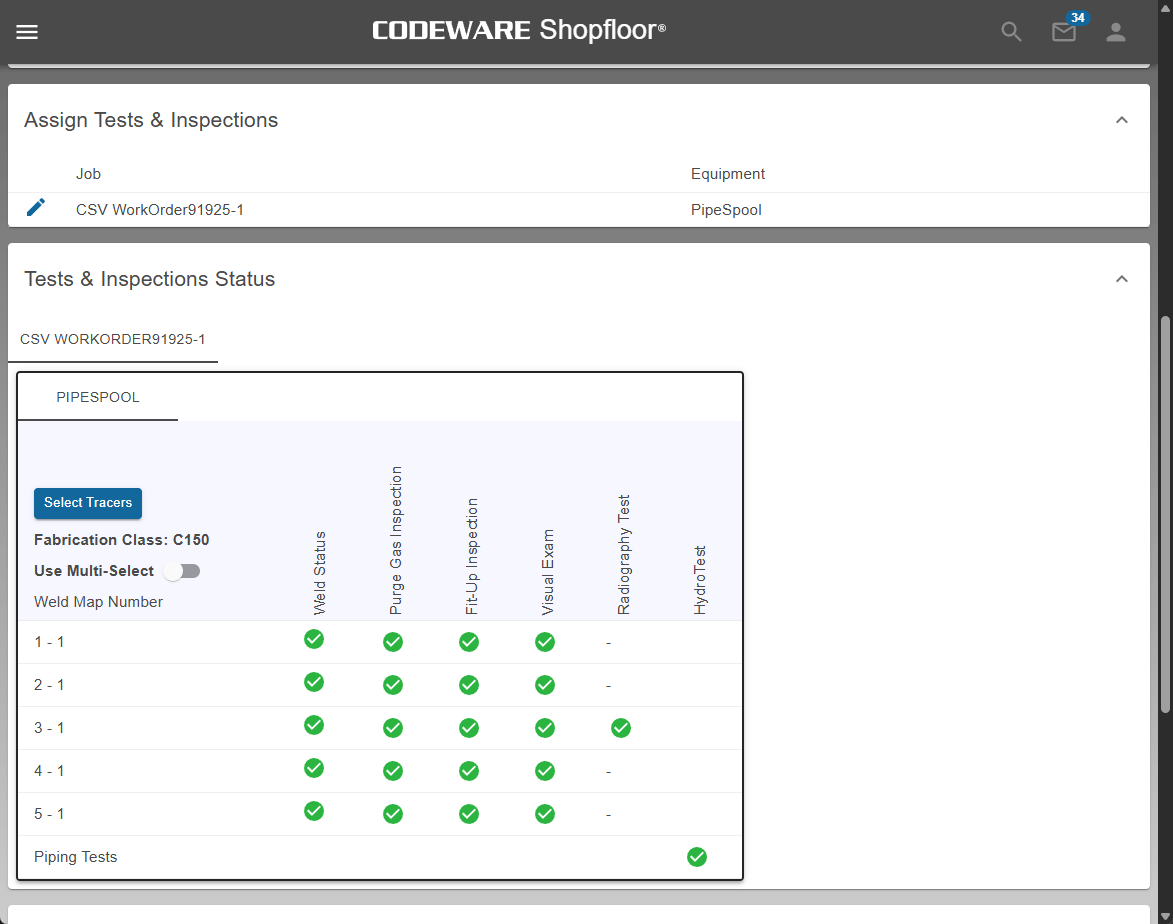
Shopfloor QC Dashboard - Track Progress

Once work is complete, view dynamic charts summarizing welder and weld performance to identify trends, track efficiency, and verify quality. The result is a clear, traceable workflow that connects weld planning, execution, inspection, and performance review — all in one streamlined, cloud-based system.
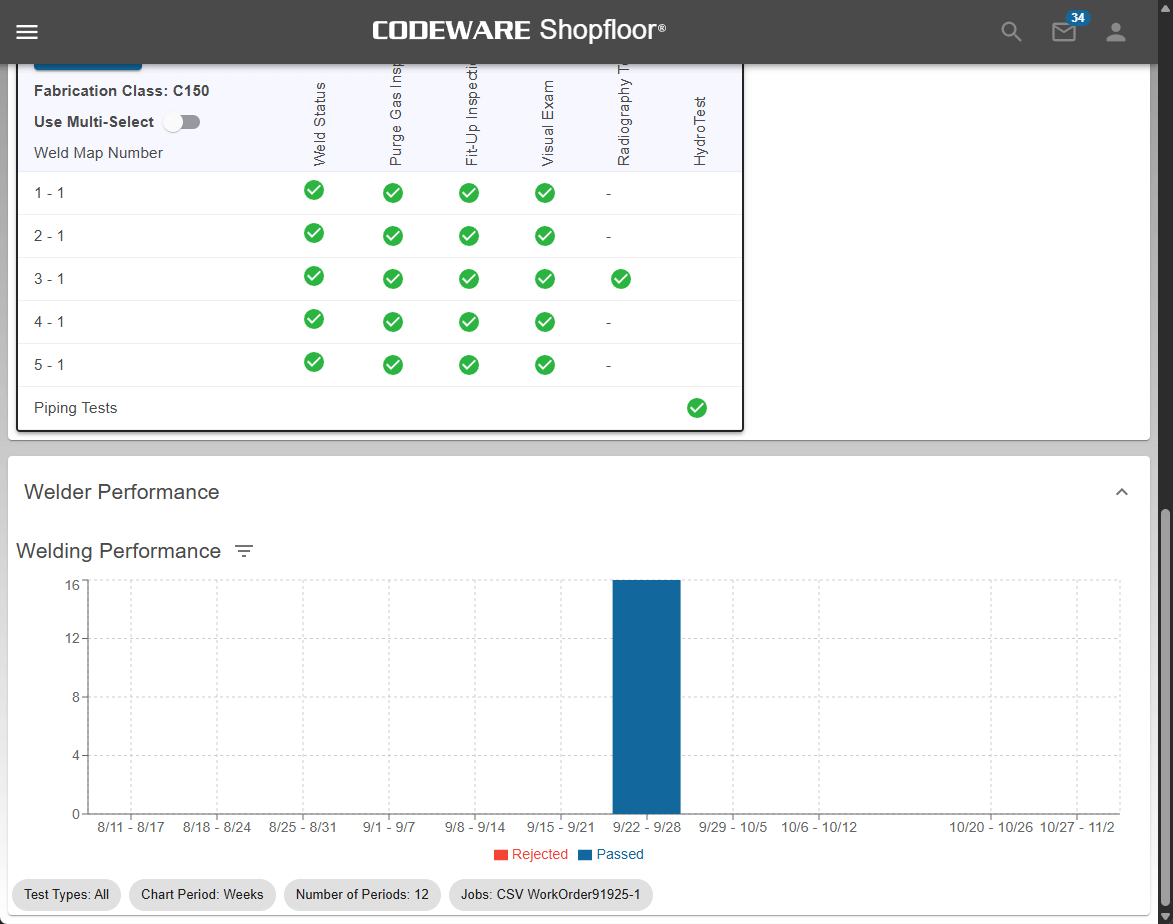
Shopfloor QC Dashboard - Review Performance

Increase Your Capabilities with Shopfloor

Shop Traveler Shopfloor’s documentation includes three types of shop travelers: general work-in-progress, materials, and welds. Welding QC Dashboard With live status views and welder performance charts, you’ll streamline production, strengthen compliance, and keep every project on schedule. Tubesheet Mockup Store and manage testing results for Tubesheet Mockup Procedures. Turnover Package Drastically cut the time it takes to prepare a fabrication document turnover package for your clients, on demand. Welding Code Checks Shopfloor performs rigorous ASME IX and AWS Code checks as welding forms are created. Continuity Alerts Shopfloor provides email alerts for pending welder expirations and weld log updates for individual or multiple welders. Welding Procedures (WPS) Shopfloor includes support for creating and using AWS prequalified welding procedures. AWS Lookup App Quickly find the AWS Standard Welding Procedure you need and integrate it into Shopfloor. Tube Expansion Procedures Shopfloor includes tube expanding procedures and qualifications from Nonmandatory Appendix HH of ASME VIII-1. Piping Classes One Pipe Class defines a variety of piping specification and the required testing for each welded joint. Tubesheet Mockup in Shopfloor ASME IX and AWS Code Checks in Shopfloor Turnover Packages in Shopfloor Shop Traveler feature in Shopfloor Welder Continuity WPS in Shopfloor AWS SWPS Joint Search App New Tube Expansion Procedure in Shopfloor Welding QC Dashboard in Shopfloor Pipe Class feature in Shopfloor

Shopfloor

ASME IX and AWS Welding Procedure Software