
Automate ASME/NBIC Forms Preparation
Filling out and managing ASME and National Board registration forms is a time consuming, error prone task. With the COMPRESS Forms Tool you can:
Is the Forms Tool a standard COMPRESS feature?
How does it work?
How does it work?
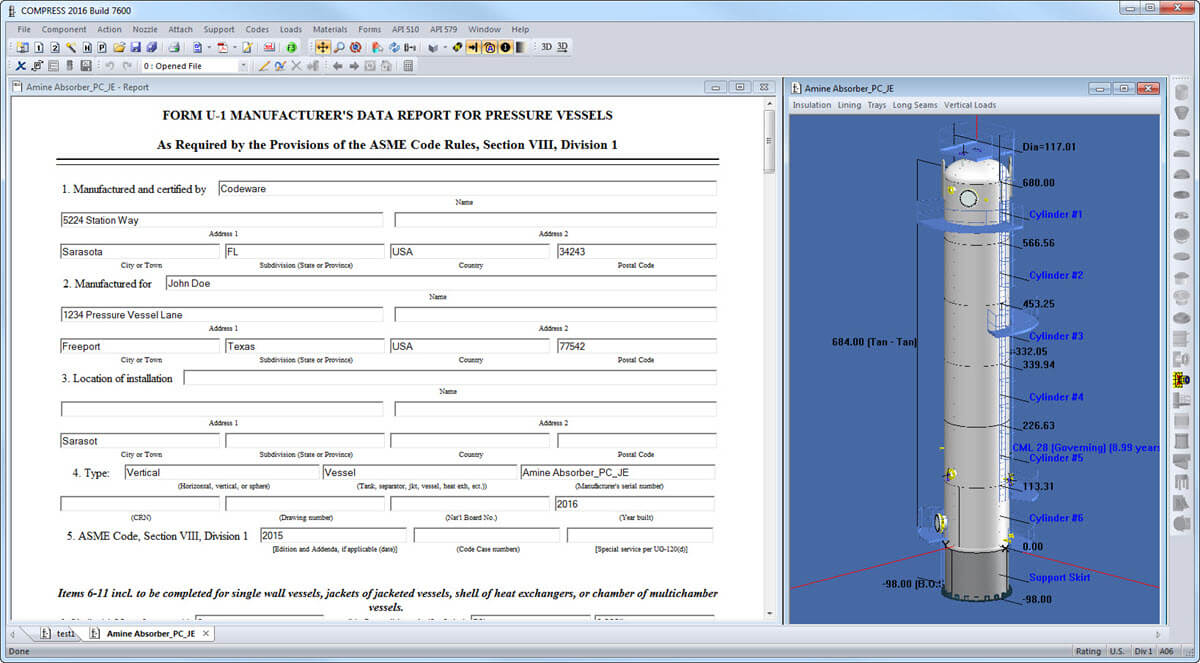
Yes, the COMPRESS Forms Tool is a standard COMPRESS feature. All forms-related functionality is available from the Forms menu. To create your form:
- Select Forms > Form Settings to store repeated information, such as your company name, address and National Board Manufacturer ID, in a centralized location for use on all forms.
- Select the form type you require from the Forms menu. COMPRESS automatically fills in your vessel or exchanger data and displays an editable form. View the form editing screen.
- Click the "Generate" button to save your form.
- Select Forms > Submit Electronically to create an EDT-compatible file. This file can be uploaded directly to the National Board's website.
- Select Forms > Manage Forms to archive forms and related files in a central database as well as manage your National Board Log. View the forms management interface.


+1 (941) 927-2670 | sales@codeware.com